SEO & GrowthNews & analysis
Google tests AI local results without Call and Directions buttons
By TrioFlare teamPublished Reviewed 5 min read
Select an image to open a larger version.
Google is testing a version of local results, shown inside an AI Overview, that leaves out the Call, Website and Directions buttons. Only some searchers are seeing it, and it is a test, not a confirmed permanent change. You do not need to panic, but it is a good moment to make sure customers can reach you through more than one button.
This is news and practical advice based on a report published on 10 November 2026, checked on 11 November 2026.
What was reported
On 10 November, Barry Schwartz at Search Engine Roundtable reported the test. The “local pack” is the short list of nearby businesses with a map that Google shows for searches such as “dentist near me”. An AI Overview is the AI-written summary that sometimes appears at the top of Google results.
In the version being tested, the AI Overview lists local businesses but drops the action buttons, along with reviews and photos. Local search specialist Joy Hawkins spotted it on mobile and said details such as address and hours were also missing. Schwartz said he was able to see it himself.
Google had not commented in the report. Google tests layouts all the time, and many tests are dropped or changed. We would not plan around this version staying.
Why it matters for a local business
For many shops, clinics and service businesses, a tap on Call or Directions is how a search turns into a customer. If a layout hides those buttons, a searcher has to take an extra step: open your profile, search your name again, or visit your website.
You cannot control Google’s layout. You can control how complete your listing is, and how easy your website makes the next step.
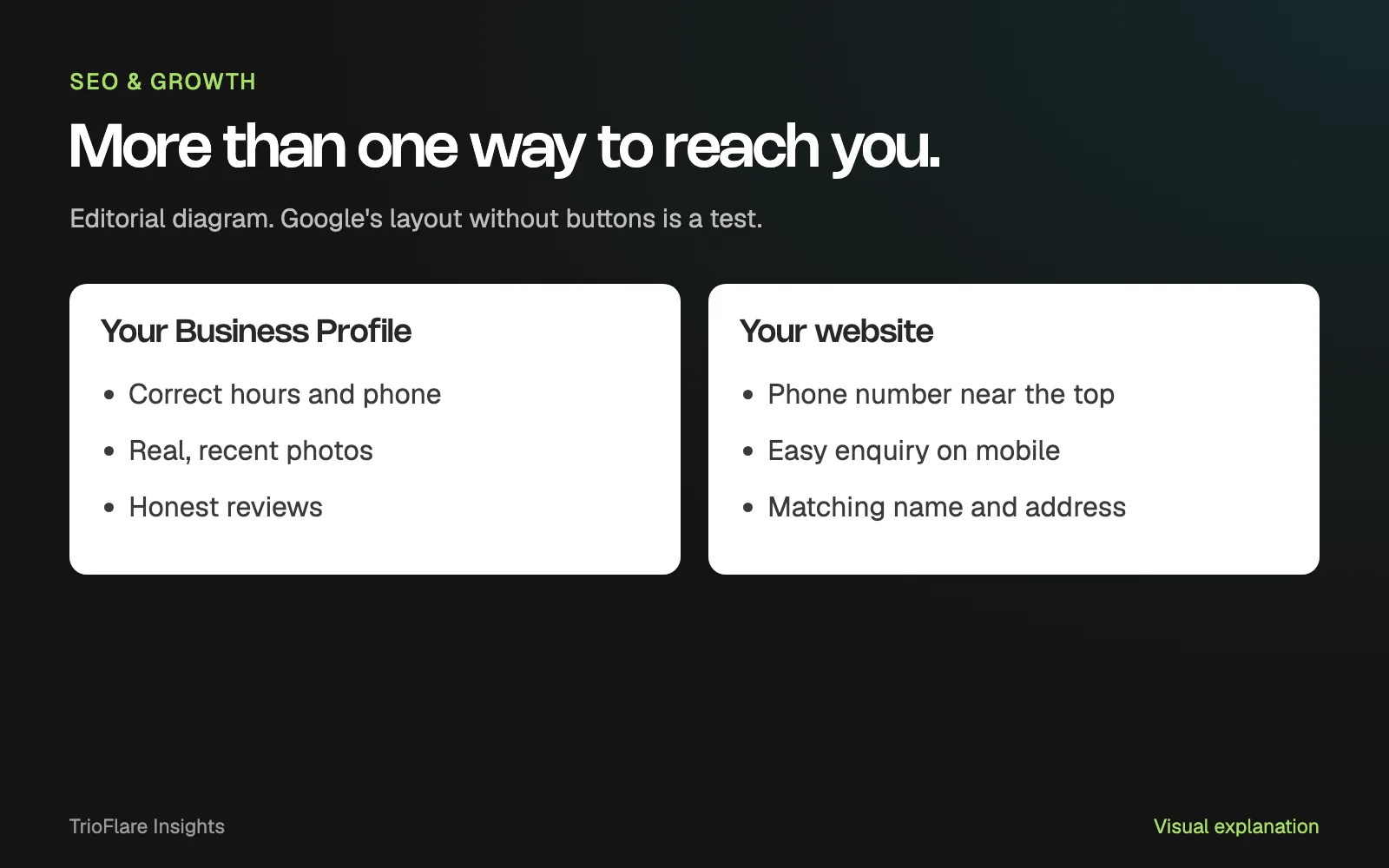
Make your Business Profile complete and accurate
Google says businesses with complete and accurate information are more likely to show in local results. Its local ranking tips list the basics.
Hours, including special hours
Keep regular hours current, and add special hours for festivals, holidays and any closures. Wrong hours lose trust quickly.
Phone number and categories
Use a phone number that is answered at that location. Google’s guidelines for representing your business prefer a local number over a central helpline. Choose the category that best describes what you are, not every service you have ever offered.
Photos
Google suggests adding photos and videos to show what you offer. Use real pictures of your shop front, your team at work or your products, and replace old ones when things change.
Keep your name, address and phone the same everywhere
Google’s guidelines ask that your profile show your business as it appears in the real world: the same name as your signboard and website, a precise address and a phone number for that location. Do not add keywords or taglines to your business name.
Check that the name, address and phone number on your website match your profile exactly. Then check any directories or social pages you control. Matching details make it easier for people to recognise they have found the right business.
Make your website do the job a button would
If someone cannot tap Call in the search result, your website is often the next stop. Open it on your phone and check a few things:
- Your phone number is visible near the top and starts a call when tapped.
- There is one clear way to ask a question or book, such as a short form or a WhatsApp link.
- Your address and a map link are easy to find, if customers visit you.
- Opening hours on the site match your Business Profile.
Keep enquiry forms short. Ask only for what you need to reply.
Ask for reviews honestly
Google says replying to reviews shows you value feedback, and that more reviews and positive ratings can help local ranking. Its tips to get more reviews explain how to copy your review link or QR code from your profile and share it, for example in a thank-you message or on a receipt.
Ask real customers after a real job or visit. Google’s rules treat offering discounts or freebies in exchange for reviews as fake engagement, which is not allowed.
Track calls and enquiries so you notice changes
Business Profile has a performance section for verified profiles. It shows calls from the Call button, website clicks and direction requests, among other actions.
Write these three numbers down once a month, along with enquiries that came through your website, phone and WhatsApp. If calls from Google drop while website enquiries rise, people may simply be taking a different route. If everything drops, check your profile for wrong details first.
Common questions
Has Google removed the Call button for everyone?
No. The report describes a test in the AI Overview version of local results, seen by some searchers. It did not say how widely the test is running. Joy Hawkins noted that when this version appeared on her phone, the usual local pack was not shown.
Should I change anything because of this test?
You do not need to react to the test itself. The steps above are worth doing anyway, because they help customers reach you in whatever layout Google shows.
Can I pay Google to rank higher in local results?
Google says there is no way to request or pay for a better local ranking. Ads are a separate, paid placement.
How long do profile changes take to show?
Google’s help pages say edits can take up to three days to appear, according to its guide on finding your business on Google.
A sensible next step
Spend twenty minutes this week checking your profile and opening your website on your phone. If you would like a second pair of eyes on your local listing and site, our SEO services page explains how we help, or you can contact us with your questions.
Try this on your own project
Checks reset when you reload this page.
Key takeaways
- This is a test seen by some searchers, not a confirmed permanent change.
- Google had not commented in the report we checked.
- A complete profile and an easy mobile website help whichever layout people see.
- Track your calls and enquiries so you notice a change early.