Cloud & SecurityExplained
How does an SSL certificate (HTTPS) protect your website?
By TrioFlare teamPublished Reviewed 5 min read
Select an image to open a larger version.
HTTPS protects information such as passwords and enquiry details while it travels between a browser and the server. The certificate helps the browser confirm it has reached the right web address before it sends that information. When a host offers an “SSL certificate” today, it usually means the certificate your site uses for TLS, the technology behind HTTPS.
What happens when a customer opens your website?
Think about a customer filling in your contact form on shared Wi-Fi. Their browser connects to your website over HTTPS before sending the form. The connection gives them three protections. MDN’s guide to Transport Layer Security
- It checks the address. The browser checks that the certificate covers the address the customer opened, comes from a trusted chain of issuers and is within its validity dates.
- It keeps the form private in transit. The browser and server use encryption so someone watching the connection cannot read the details the customer sends.
- It detects changes in transit. The browser can tell if the protected data was altered as it travelled.
A certificate is one part of that process. The server proves it holds the private key associated with the certificate, and TLS sets up the protected connection. Once the enquiry reaches your business, you still need to decide who can read it and where it is stored. As a visitor, check that the address belongs to the business you meant to reach before sharing anything sensitive.
Try it by checking a real certificate
You can practise on example.com, an address IANA maintains for documentation. There’s nothing you need to submit.
- Open the address in desktop Firefox. Select the site information icon to the left of the address bar.
- Choose Connection secure, then More information or More site information. Select View Certificate. Mozilla’s certificate walkthrough
- Find Issuer Name to see who issued the certificate. Under Validity, Not After is the expiry date. Check Subject Alt Names for the addresses the certificate covers.
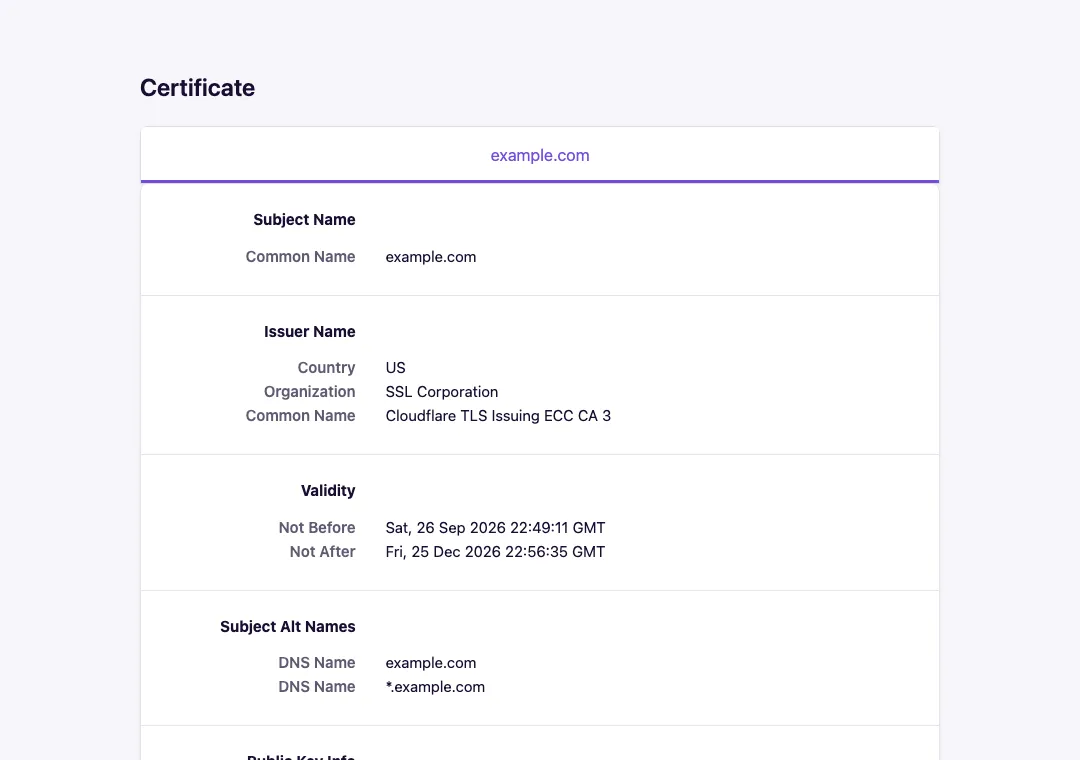
Now open the real link you send to customers and repeat the check. If you use both your main domain and its www version, try both addresses. Check any separate booking or shop address too. Even an address that immediately redirects to another page needs a valid certificate when visitors open it directly over HTTPS.
See what happens when a certificate expires
An expired certificate can stop a customer before your page appears. The screenshot below comes from a public browser test page with a deliberately expired certificate. The warning is the browser’s response to the failed certificate check. BadSSL test pages
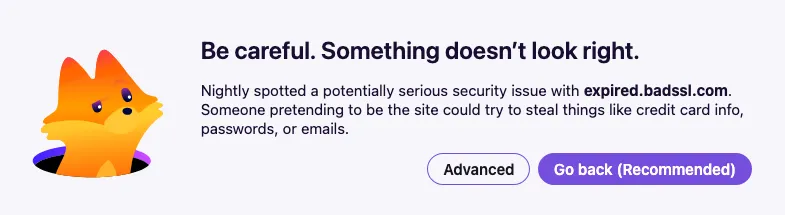
If you see a warning while trying to sign in or pay, go back. If you run the site, copy the exact address and warning, and note when you saw it. If several unrelated sites show a date warning on the same device, check that its date, time and time zone are correct. When the warning appears on your own site from more than one device, send the evidence to your host or developer. Mozilla’s guide to certificate errors
Check the whole enquiry or purchase
Start with the links people actually receive, such as your Google Business Profile, invoice, Instagram bio or booking confirmation. Open one on a phone and follow it to the step customers need. Use your normal test process for payments or a test enquiry. Check the page that collects the information and the page that confirms it.
| What you find | What to check next |
|---|---|
| The home page opens but the booking address shows a certificate warning | Send the booking address to its provider and ask whether its hostname is covered. |
| The page opens over HTTPS but a form or video does not load | Ask your developer to check whether it still loads files or embeds over HTTP. Browsers can block them as mixed content. |
| An old HTTP link still shows an insecure page | Ask your host to redirect HTTP to HTTPS and update the original link wherever you can. |
Browsers can upgrade an HTTP link to HTTPS themselves. If the address changes when you test it, ask your host to confirm the site also redirects visitors who arrive over HTTP. MDN on mixed content and upgrading HTTP connections
Common questions
Do I need to pay for an SSL certificate?
Many hosts offer a free certificate, often through a certificate authority such as Let’s Encrypt. Check whether your plan installs and renews it automatically, and whether that includes all the hostnames customers use. How Let’s Encrypt issues certificates
Why can my home page work while checkout shows a warning?
Checkout may use a different hostname or payment provider. Open the exact checkout link and look at the address where the warning appears. Report it to the provider responsible for that address.
Who should look after renewal?
Find out whether your host, developer or another provider manages it. Ask where renewal failures are reported and who receives those alerts. If a service is moved or a hostname changes, check its certificate again after the move.
If you’re unsure who manages the certificates for your website, shop or booking system, our Cloud Solutions team can help you check.
Try this on your own project
Checks reset when you reload this page.
Key takeaways
- HTTPS protects information as it travels between a browser and the server it connects to.
- Check the names and expiry date on the certificate for each address customers use.
- If a certificate warning appears, stop before entering any information and report the exact address.